TOMLOV P10 Microscope review buyers usually want one thing: a simple way to inspect tiny details without setting up a desktop scope.
This model fits that brief with a fixed 100X handheld design, a 2-inch screen, and portable features aimed at collectors, hobbyists, and casual field use.
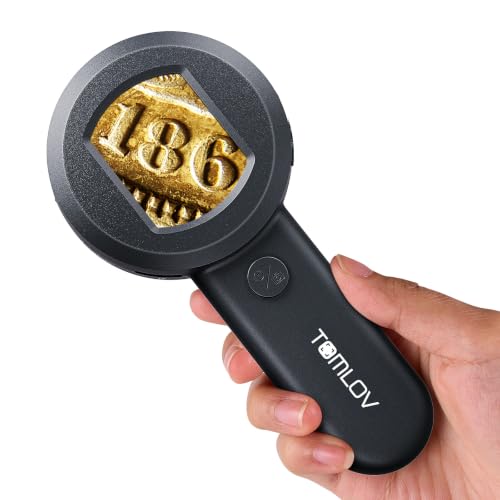
P10 Microscope Review Summary
The TOMLOV P10 is best understood as a portable inspection tool first and a microscope second.
It is a strong fit if you want to check coins, jewelry, leaves, trichomes, stamps, or small parts quickly, without relying on a phone attachment or a full bench setup.
Its appeal is straightforward: the screen makes viewing immediate, the lights help you see detail in low light, and the lightweight body makes it easy to carry.
That makes it useful for hobbyists, students, collectors, and anyone who wants an easy handheld closer look.
The tradeoff is equally clear: this is a fixed-focus, fixed-magnification device, so it favors convenience over flexibility.
Review Scorecard
| Category | Score | Why it scores this way |
|---|---|---|
| Portability | 9/10 | At 3.9 oz, it is easy to slip into a bag, pocket, or tool kit. |
| Ease of use | 9/10 | Power on, hold near the subject, and view the result on the built-in screen. |
| Viewing convenience | 8/10 | The 2-inch LCD gives immediate live viewing without extra gear. |
| Inspection versatility | 8/10 | White LEDs, UV lights, camera, and PC connection broaden its use cases. |
| Precision control | 6/10 | Fixed 100X magnification and fixed focus limit fine-tuning. |
| Field practicality | 8/10 | Built-in memory and up to 50 minutes of use support quick sessions away from a desk. |
| Value for niche buyers | 8/10 | It is well matched to casual inspection tasks more than specialized microscopy. |
Key Features and Specifications of P10 Microscope
The listing positions the TOMLOV P10 as a handheld digital microscope for quick close-up inspection.
It offers fixed 100X magnification with 4X zoom, and the working distance is stated as about 0.3 inches from the object.
That matters because it tells you this is designed for near-contact viewing rather than scanning a subject from farther away.
Several hardware details help define the experience:
- 2-inch LCD screen for live viewing
- 100X fixed magnification
- 4X zoom
- 4 white lights and 4 UV lights, with dimming support
- 16MP camera
- Built-in memory for up to 300 photos
- USB connection for computer viewing
- Up to 50 minutes of use
- Weight listed at 3.9 oz
Those specifications point to a very specific kind of buyer.
The P10 is not trying to replace a lab microscope.
It is trying to make close inspection easy for everyday tasks where speed, visibility, and portability matter more than variable optics.
The white and UV lighting is a useful addition for coin, jewelry, and small-object inspection.
White light helps with general viewing, while UV adds another angle for checking details that respond differently under ultraviolet illumination.
The listing also emphasizes computer connection, which is helpful if you want a larger screen for sharing or reviewing images after a session.
Pros and Cons of P10 Microscope
Pros
- The built-in screen makes viewing immediate and beginner-friendly.
- The handheld format is genuinely portable at 3.9 oz.
- White and UV lighting increase usefulness across different objects.
- Built-in memory and camera functions support quick documentation.
- The USB computer connection is useful for larger viewing and sharing.
Cons
- Fixed 100X magnification limits flexibility.
- Fixed focus means you work within the device’s intended distance, not freely.
- The 2-inch screen is convenient, but still small compared with a monitor.
- It is better for inspection tasks than for more serious microscopy workflows.
The biggest strength here is convenience.
The biggest limitation is also convenience: the P10 is intentionally narrow in scope.
If that scope matches your use case, the tradeoffs are easy to accept.
Who Should Buy P10 Microscope?
Buyers who want a simple handheld way to inspect small objects are the natural audience.
That includes coin collectors checking surface details, jewelry owners looking for visible imperfections, gardeners checking trichomes or plant pests, and students who need a quick educational look at small items.
It also makes sense for people who dislike fiddly setup.
If you do not want to pair a phone, mount a scope, or sit at a desk, the P10’s screen-first design is practical.
The built-in memory is especially helpful for collectors and hobbyists who want to save a few images for later reference.
You should probably skip it if you need:
- variable magnification across a wide range
- a larger observation screen out of the box
- detailed lab-style work
- a microscope for repeated long sessions
For those buyers, a more traditional digital microscope or a stronger desktop setup will be a better fit.
The P10 is optimized for fast access, not maximum adaptability.
How the P10 Microscope Works in Practice
Screen-First Viewing
The 2-inch LCD is the defining feature of the P10 experience.
Instead of peering through a lens, you view the subject directly on the device, which makes it easier to share what you are seeing with someone nearby.
For quick checks, that is less awkward than a traditional loupe and less dependent on perfect eye position.
Lighting and Detail
The mix of white and UV lights adds useful control over visibility.
White light is the everyday mode for general viewing, while UV is there for situations where different surface responses matter.
The dimmable lighting is important because it helps reduce glare on reflective items like coins or jewelry.
Portability and Workflow
The lightweight build and built-in memory make the P10 feel like a carry-along tool rather than a desktop device.
That is a real advantage for flea markets, classrooms, gardens, or hobby benches where you want a fast answer and do not want to move equipment around.
The USB connection adds a second workflow if you want to move from handheld inspection to a bigger screen.
Limits of Fixed 100X
The fixed 100X magnification is both the feature and the limitation.
It simplifies the device and keeps it easy to use, but it also means you are buying into one inspection perspective.
That is fine if your main job is checking tiny details at close range.
It is less ideal if you want broad optical flexibility.
Alternatives to P10 Microscope
If you want a different fit, these Amazon search alternatives are worth comparing:
- Carson MicroBrite Plus
- Dino-Lite digital microscope
- Jiusion digital microscope
- Andonstar digital microscope
Carson is a sensible comparison if you want a compact optical inspection tool.
Dino-Lite and Andonstar are stronger names to compare if you want a more established digital microscope route, while Jiusion is a common search path for budget-minded desktop-style alternatives.
The right choice depends on your workflow.
If you want the simplest handheld experience, the P10 stays attractive.
If you want more viewing flexibility, a larger screen, or a more traditional microscope setup, one of the alternatives may fit better.
Is P10 Microscope Worth It?
The TOMLOV P10 is worth it for buyers who want fast, portable, screen-based close inspection and are comfortable with a fixed 100X design.
It is a good buy for coin collectors, jewelry users, hobbyists, and casual field checks where ease of use matters more than optical range.
If you need a compact tool that is simple to carry, simple to view, and simple to document with, the P10 is a practical choice.
If you need more control, more magnification options, or a bigger-screen workflow, keep looking.