Choosing a Secret Santa gift for a designer is easier when you focus on how they work: sketching, color, screen space, or desk comfort. This list mixes hands-on creative supplies with useful tools for a digital workspace.
Christmas Gifts for Designers
1. Liene M110 Portable Photo Printer
For turning inspiration into prints
Liene M110 Portable Photo Printer

- Prints 4×6-inch photos and 3×3-inch sticker paper with separate trays.
- Connects to phones over Bluetooth for printing without cables.
- The app offers borders, filters, and brightness and contrast adjustments.
Best For: Designers who collect visual references or like printing snapshots from a phone.
2. ARZOPA 16-Inch 2.5K Portable Monitor
A second screen for work on the move
ARZOPA 16-Inch 2.5K Portable Monitor

- The 16-inch display has a 2560×1600 resolution and 16:10 aspect ratio.
- USB-C and HDMI inputs support connections to listed laptops, tablets, and phones.
- Its listed weight is 1.46 pounds, for a more portable desk setup.
Best For: Designers who want extra screen space while working away from their main desk.
3. Acer 13-in-1 USB-C Docking Station
A hub for a more connected desk
Acer 13-in-1 USB-C Docking Station

- Includes two HDMI ports, one DisplayPort, USB ports, Ethernet, and an SD/TF reader.
- The included 110W adapter provides up to 100W laptop charging through the USB-C PD host port.
- Triple display support depends on Windows laptop capabilities; macOS supports mirroring across multiple displays.
Best For: Designers with a compatible laptop who connect several desk peripherals or displays.
4. MEEDEN 72-Color Oil-Based Pencil Set
For sketching and color studies
MEEDEN 72-Color Oil-Based Pencil Set
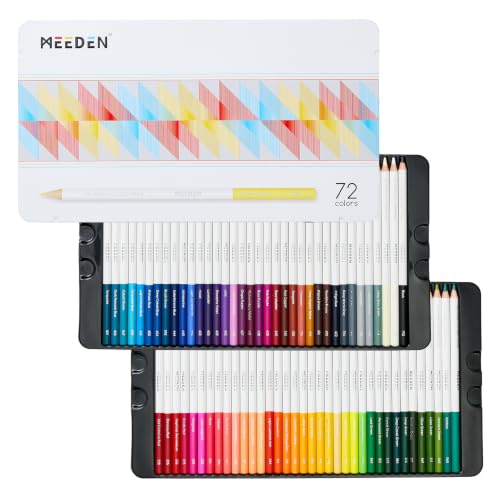
- The set includes 72 named colors in a sturdy metal storage tin.
- High-density pigment cores are described as smooth and suitable for layering.
- The listing names sketching, graphic design, journaling, and coloring as uses.
Best For: Designers who enjoy exploring ideas on paper with colored pencils.
5. HUANUO Adjustable Single Monitor Arm
A flexible screen position
HUANUO Adjustable Single Monitor Arm

- Fits monitors from 13 to 32 inches weighing 4.4 to 19.8 pounds, with listed VESA patterns.
- Supports tilt, swivel, and rotation adjustments.
- Mounts with either a C-clamp or grommet base; check desk fit and monitor compatibility.
Best For: Designers who want to reposition a compatible screen for editing or reviews.
6. Redragon K580 Wired Mechanical Keyboard
Shortcuts at the keyboard
Redragon K580 Wired Mechanical Keyboard

- Five onboard macro keys let users record combinations without software.
- Dedicated controls include media buttons and a volume wheel.
- The 104-key keyboard has clicky Blue switches and RGB backlighting.
Best For: Designers who type often and want programmable keys for recurring actions.
7. ComfiLife Adjustable Memory Foam Footrest
A little more comfort at the desk
ComfiLife Adjustable Memory Foam Footrest

- The memory foam footrest has adjustable height and a removable, machine-washable cover.
- It can be used under a desk, beneath the knees, or flipped as a chair rocker.
- A carry handle makes it easier to move between workspaces.
Best For: Designers who spend long stretches seated at a desk.
8. MemOffice 120-Color Alcohol Marker Set
For bold hand-rendered concepts
MemOffice 120-Color Alcohol Marker Set

- The 120 markers have fine and broad tips for details and larger areas.
- Alcohol-based ink is described as blendable and quick-drying.
- Color-coded caps and a carrying case help with selection and storage.
Best For: Designers who sketch illustrations, lettering, or fashion concepts by hand.
9. Aothia PU Leather Desk Pad
A broad, smooth work surface

- The 31.5-by-15.7-inch pad can fit a laptop, mouse, and keyboard.
- Its smooth surface can serve as a mouse pad, writing pad, or desk mat.
- The water-resistant PU leather surface can be wiped clean.
Best For: Designers who want a consistent surface for mouse work, writing, and sketching.
10. Logitech MX Ergo S Wireless Trackball
A different way to point and scroll
Logitech MX Ergo S Wireless Trackball

- The trackball uses thumb control and offers a 20-degree tilt setting.
- Six customizable buttons work with the Logi Options+ app for shortcuts and actions.
- Connects by Bluetooth or the included Logi Bolt USB receiver.
Best For: Designers curious about a trackball or seeking another pointing option for desk work.
11. Datacolor Spyder Monitor Calibrator
12. BenQ PD2706U 27-Inch 4K Monitor
A detailed display for visual work
BenQ PD2706U 27-Inch 4K Monitor

- The 27-inch IPS monitor has a 3840×2160 resolution and a matte screen.
- The listing gives 99% sRGB/Rec.709 and 95% P3 coverage with Delta E ≤ 3.
- USB-C supports image, video, data, and up to 90W charging in one connection.
Best For: Visual designers who want a large 4K screen for detailed creative work.
13. Bose QuietComfort Wireless Headphones
A quieter space for concentration
Bose QuietComfort Wireless Headphones

- Quiet and Aware listening modes let the wearer choose noise cancellation or awareness.
- The over-ear headphones offer adjustable EQ and multipoint Bluetooth.
- The listing states up to 24 hours of battery life and includes a protective case and audio cable.
Best For: Designers who listen while focusing, commuting, or working between locations.
14. Dahle 508 18-Inch Rotary Paper Trimmer
For clean paper mockups
Dahle 508 18-Inch Rotary Paper Trimmer

- The trimmer has an 18-inch cut length and a five-sheet capacity.
- Its self-sharpening blade cuts in both directions and has a protective housing.
- An automatic clamp and screened guides help hold and align paper.
Best For: Designers who make paper prototypes, trim prints, or assemble physical mockups.
15. Wacom Intuos Medium Bluetooth Drawing Tablet
Pen input for digital creativity
Wacom Intuos Medium Bluetooth Drawing Tablet

- The medium tablet includes a battery-free pen and four ExpressKeys.
- Connects by Bluetooth or USB-A and is listed as compatible with Mac, PC, and Chromebook.
- The listing includes access to creative software and online training after registration.
Best For: Designers who draw, edit images, or prefer pen input for digital work.
How to Choose Secret Santa Gifts for Designers
“Designer” covers many kinds of work, so start with clues about the recipient’s routine. Someone who sketches may appreciate colored pencils, alcohol markers, or a Wacom tablet. A designer who works mainly on a computer may get more use from a monitor, dock, mouse, or keyboard. If their workspace is shared or they travel between locations, portable gear and items that move easily between desks can be especially practical.
When you are unsure what software or equipment they use, choose an item that complements a routine without requiring a major change. A desk pad, footrest, headphones, or paper trimmer can fit into an existing setup. Creative supplies are also a good option when you know they enjoy drawing by hand, but consider whether markers or pencils match their preferred medium. A thoughtful Secret Santa gift can support the process without trying to guess the next big tool they need.
Match the Gift to Your Budget
For a modest Secret Santa budget, look at desk accessories and portable creative supplies. A desk pad adds a generous surface for a mouse, keyboard, and laptop; a footrest brings a comfort option to long desk sessions. The pencil and marker sets offer many colors for someone who likes visual experimentation. These gifts feel tied to design without needing to know a recipient’s exact computer model.
More specialized equipment, such as a monitor arm, color calibrator, drawing tablet, or portable monitor, may suit a group exchange or a higher spending limit. A full-size 4K monitor and multiport docking station are larger workspace gifts. Before selecting a more expensive item, check whether the recipient has the space and equipment to use it. A useful gift is one that fits into their real setup, rather than one that only sounds impressive.
Check Compatibility and Personalization
Compatibility matters most with displays and computer accessories. A docking station’s features depend on the laptop’s USB-C, graphics, and system support; its triple-display mode is described for Windows, while macOS supports mirroring across multiple displays. A monitor arm needs a screen within its supported size and weight range, a matching VESA pattern, and a desk that can take the clamp or grommet mount. The monitor and trackball list connection requirements and platform details worth checking before buying.
For a drawing tablet, verify that the recipient’s computer supports the listed operating system and that they would welcome a screenless pen tablet. For a printer, consider whether printing photos or small reference images fits their interests, and remember that the supplied notes specify Liene-compatible paper and cartridges. These small checks can make a technical present feel personal: you are paying attention to how the designer works, not just the job title.
Timing and Last-Minute Decisions
If Christmas is close, favor gifts that do not require extensive setup or knowledge of the recipient’s hardware. A desk mat, footrest, headphones, paper cutter, or art supply set can be understood quickly and used in different creative routines. For a dock, display, calibration tool, or tablet, allow time to confirm compatibility and for the recipient to set up the device with their computer.
Avoid basing the choice on assumed delivery timing; check current availability and arrival estimates when you shop. If there is little time to research, choose a broad-use item grounded in what you already know: sketching supplies for someone who draws, a desk accessory for someone who spends the day at a workstation, or headphones for someone who listens while working. That makes a Christmas gift feel considered, even in a Secret Santa exchange.